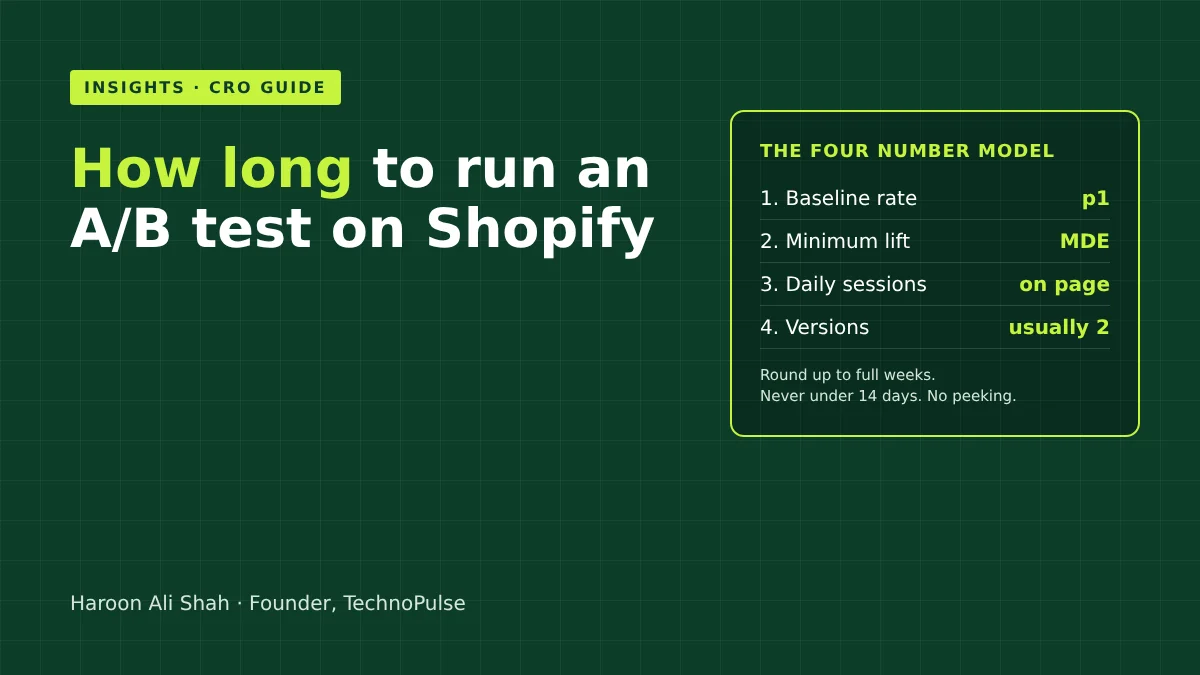
How long to run an A/B test on Shopify comes down to four numbers: your baseline conversion rate, the smallest lift you care about, the daily sessions reaching the page you are testing, and how many versions you split traffic between. Run the math and most DTC stores need several weeks, sometimes months, which is a lot longer than the “two weeks and 1,000 visitors” rule most guides repeat.
I have helped 200+ DTC brands since 2021, and the most common testing mistake I see is not a bad hypothesis. It is a good hypothesis judged on too little data. A founder runs a new product page for ten days, sees a nice looking bump, ships it, and then wonders why revenue did not move. Below is the exact model I use to size a test before it starts, with the math shown, so you can do it in a spreadsheet in five minutes.
Why the common rules of thumb fail
Shopify’s own A/B testing guide says each variation should have at least 1,000 visitors and suggests letting a test run for two weeks. That is a fine starting point for a landing page with a huge expected swing. It is not enough for a typical store conversion rate.
Here is why. Take a store converting at 2.5 percent. A thousand visitors per version means about 25 orders on each side. With the standard settings (95 percent confidence, 80 percent power), a sample that small can only reliably detect a change of roughly 100 percent, meaning the new version would have to double your conversion rate. Real wins on a mature store are far smaller than that. So the 1,000 visitor rule mostly produces noise that looks like a result.
The other rule, “run it until it hits significance,” is worse. Evan Miller’s well known analysis of peeking shows that checking results repeatedly and stopping the moment the dashboard turns green can push the real false positive rate far above the 5 percent you think you are accepting. In his worst case example, where results are checked after every observation and there is no real difference at all, the false positive rate reaches 26.1 percent. You decide the sample size first, then you wait.
How long to run an A/B test: the four number model
This is the model I use with clients before any test goes live. It takes four inputs and gives you a run time in full weeks.
1. Baseline conversion rate
Use the conversion rate of the page or step you are testing, not your store average. If you are testing a product page, the right baseline is orders divided by sessions that saw that product page, over the last 30 to 60 days. Lower baselines need much bigger samples.
2. Minimum detectable effect
This is the smallest relative lift that would be worth shipping. Be honest here. If a 5 percent lift would not change your decision, do not size the test for it. Sizing for a 20 percent lift instead of 10 percent cuts the sample you need by about three quarters, because the required sample grows with the square of how small the effect is.
3. Daily sessions on the tested page
Count only sessions that actually see the change. A test on one product page gets that product’s traffic, not your whole store’s. This is where most duration estimates go wrong.
4. Number of versions
Every version needs its own full sample. An A/B test splits traffic in two. Add a third version and each one gets a third of the traffic, so the test takes 50 percent longer. On most Shopify stores I keep it to two.
The formula
For conversion rates, the sample needed per version at 95 percent confidence and 80 percent power is approximately:
n per version = 7.85 × (p1 × q1 + p2 × q2) ÷ d²
Here p1 is your baseline, p2 is the baseline times one plus your minimum lift, q is one minus each rate, d is the gap between p2 and p1, and 7.85 comes from the confidence and power settings. Then:
- Days needed = (n per version × number of versions) ÷ daily sessions on the page
- Round up to full weeks, so every weekday and weekend is counted equally
- Never go below 14 days, even if the math says less
The 14 day floor is my own rule. Optimizely’s experiment duration guidance sets a minimum of one business cycle, which it defines as seven days. For DTC brands I double that, because paydays, email sends and weekend shopping all shift behavior from one week to the next.
A worked example with real math
This is an illustrative example, but it is the shape of store I see most often. A skincare brand gets 1,500 sessions a day on its best selling product page, which converts at 2.5 percent. The team wants to test a new layout with reviews moved above the fold.
Scenario A: they want to detect a 10 percent lift, from 2.5 to 2.75 percent.
- n per version = 7.85 × (0.025 × 0.975 + 0.0275 × 0.9725) ÷ 0.0025² ≈ 64,200 sessions (d is 0.0025)
- Two versions = 128,400 sessions
- 128,400 ÷ 1,500 per day ≈ 86 days, which rounds up to 13 weeks
Scenario B: they size it for a 20 percent lift, from 2.5 to 3.0 percent.
- n per version ≈ 16,800 sessions
- Two versions = 33,600 sessions
- 33,600 ÷ 1,500 per day ≈ 23 days, which rounds up to 4 weeks
Same store, same page, and the answer moves from four weeks to over three months just by changing what lift you are trying to catch. That is the whole decision about how long to run an A/B test in one picture. If 13 weeks is too long, you either test a bolder change that could plausibly move conversion 20 percent, or you measure a step with more events.
Sample size table for Shopify conversion rates
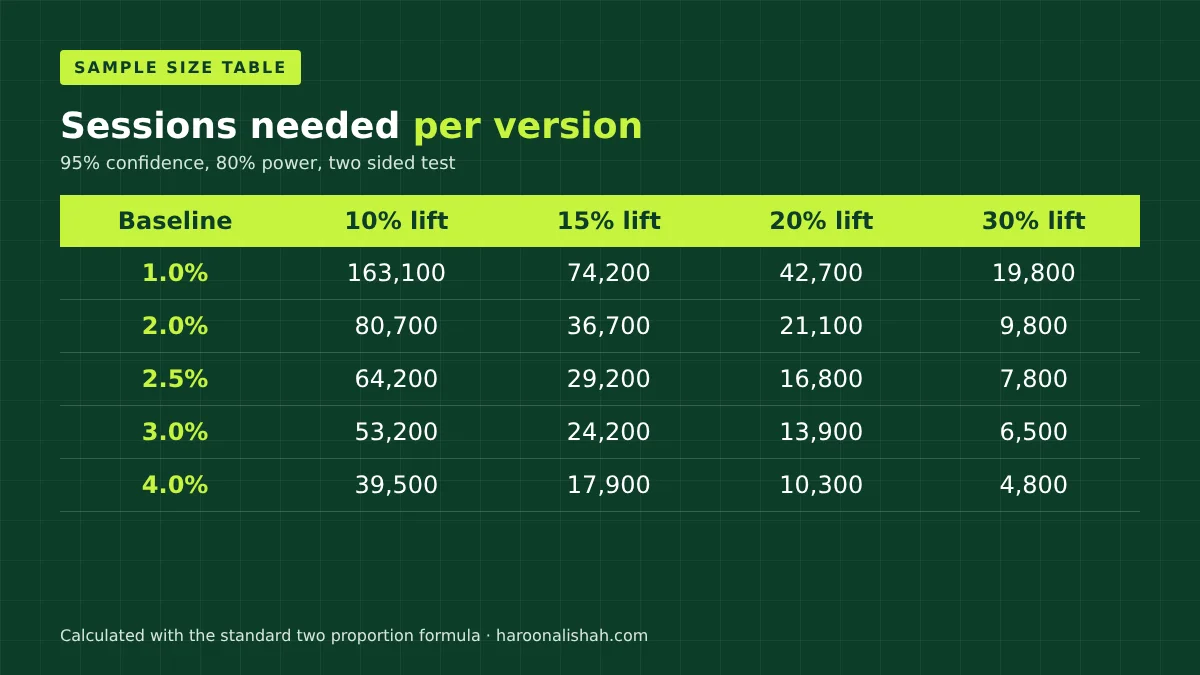
Use this table to skip the formula. Each cell is the sessions needed per version at 95 percent confidence and 80 percent power, calculated with the formula above.
| Baseline rate | 10% lift | 15% lift | 20% lift | 30% lift |
|---|---|---|---|---|
| 1.0% | 163,100 | 74,200 | 42,700 | 19,800 |
| 2.0% | 80,700 | 36,700 | 21,100 | 9,800 |
| 2.5% | 64,200 | 29,200 | 16,800 | 7,800 |
| 3.0% | 53,200 | 24,200 | 13,900 | 6,500 |
| 4.0% | 39,500 | 17,900 | 10,300 | 4,800 |
Divide the cell by half of your daily sessions on that page and you have your run time in days for a two version test.
What to do when the math says months
Most stores under a few thousand sessions a day will hit this wall. That does not mean you cannot test. It means you change what you test.
Test a step with more events
Add to cart happens far more often than purchase. In the same illustrative store, if the product page has a 7 percent add to cart rate, detecting a 10 percent lift needs about 21,800 sessions per version instead of 64,200. That is 29 days instead of 86. Just confirm with a revenue check afterward that more carts turned into more orders.
Make bigger swings
Button colors will not move a small store’s numbers enough to measure. Offer changes, bundles, a new price anchor, a rewritten product page or a different shipping offer can. My post on the free shipping threshold mistake is a good example of a change big enough to read clearly.
Pool traffic across a template
Test a change on the product template for a whole collection rather than one product. The same layout change applied to 40 products gets 40 products’ worth of sessions.
Ship best practice fixes without testing
Broken mobile menus, slow pages and missing shipping info on the product page do not need a test. Fix them. Save your traffic for decisions where you are honestly unsure. If you are not sure which bucket a change falls into, the six questions I ask before I touch a Shopify store will help you sort it.
Running the test on Shopify
Shopify added A/B testing to the theme editor through Rollouts. The Shopify changelog describes it as a way to compare your changes against your current theme with real traffic, and lists it as available on Basic plans and above, with market targeting limited to Advanced and Plus. For theme level tests that is a solid free option. For price, offer or checkout tests, a dedicated testing app still gives you more control.
Whatever tool you use, the rules for how long to run an A/B test stay the same:
- Write down the primary metric, the minimum lift and the end date before you launch
- Do not start or end a test in the middle of a sale or a big email send
- Watch guardrail metrics like average order value and refund rate, not just conversion
- Stop on the planned date, not when the chart looks exciting
- Cap tests at about eight weeks, because cookie resets start mixing visitors between versions
If you want this whole process run for you, from sizing to analysis, that is what our ecommerce CRO services team does every week.
Not sure which of these is costing your store the most? Get your free store score or book a free 15 minute audit call.
How long to run an A/B test FAQ
How long should an A/B test run?
Long enough to reach the sample size you calculated before launch, rounded up to full weeks, and never less than one full business cycle. For a page with 1,500 daily sessions converting at 2.5 percent, sizing for a 20 percent lift means about four weeks. Sizing for a 10 percent lift on the same page means about 13 weeks.
How many visitors do you need for an A/B test?
It depends on your baseline conversion rate and the lift you want to detect. At a 2.5 percent conversion rate, catching a 20 percent lift takes about 16,800 sessions per version at standard settings. The often quoted 1,000 visitors per version only detects very large changes.
What happens if you stop an A/B test early?
You raise the odds of shipping a change that does nothing. Early results swing widely, and stopping the first time you see significance can make your real false positive rate several times higher than the 5 percent you planned for. If you need to stop early, use a tool built for sequential testing.
Can you A/B test on Shopify without an app?
Yes. Shopify Rollouts lets you test a theme change against your live theme with real traffic, on Basic plans and above. For pricing, offers or deeper checkout changes, most brands still use a testing app.
Want me to size your next test or tell you if your traffic can support one? Get in touch, or look at the results we have delivered for other DTC brands.
Keep reading:
Want this done on your store?
Book a free audit call